
You write everything down. You still forget things. You're not sure what the point of writing them down was.
Designed for ADHD. Works for everyone.
You have the lists. You still forget.
It's not a discipline problem. For many people with ADHD, organisation fails not at the writing-it-down stage, but at the remembering-to-look stage. More lists won't fix that.
Loops is a daily coaching app for people with ADHD. It puts clear things in front of you when you need it, coaching for when it all piles up, and, if you want it, one person quietly in your corner.
Get Your Account, Free Forever Today.
*Terms and Conditions Apply.
*Terms and Conditions Apply.
Three things Loops does for you
One place, always visible
Not another list to forget. One source of truth that stays in front of you.
Prompts that actually land
Actions that reach you at the right moment, not the wrong one.
Nothing falls through
A daily system that catches what memory misses.
Loops is a daily coaching app for people with ADHD.
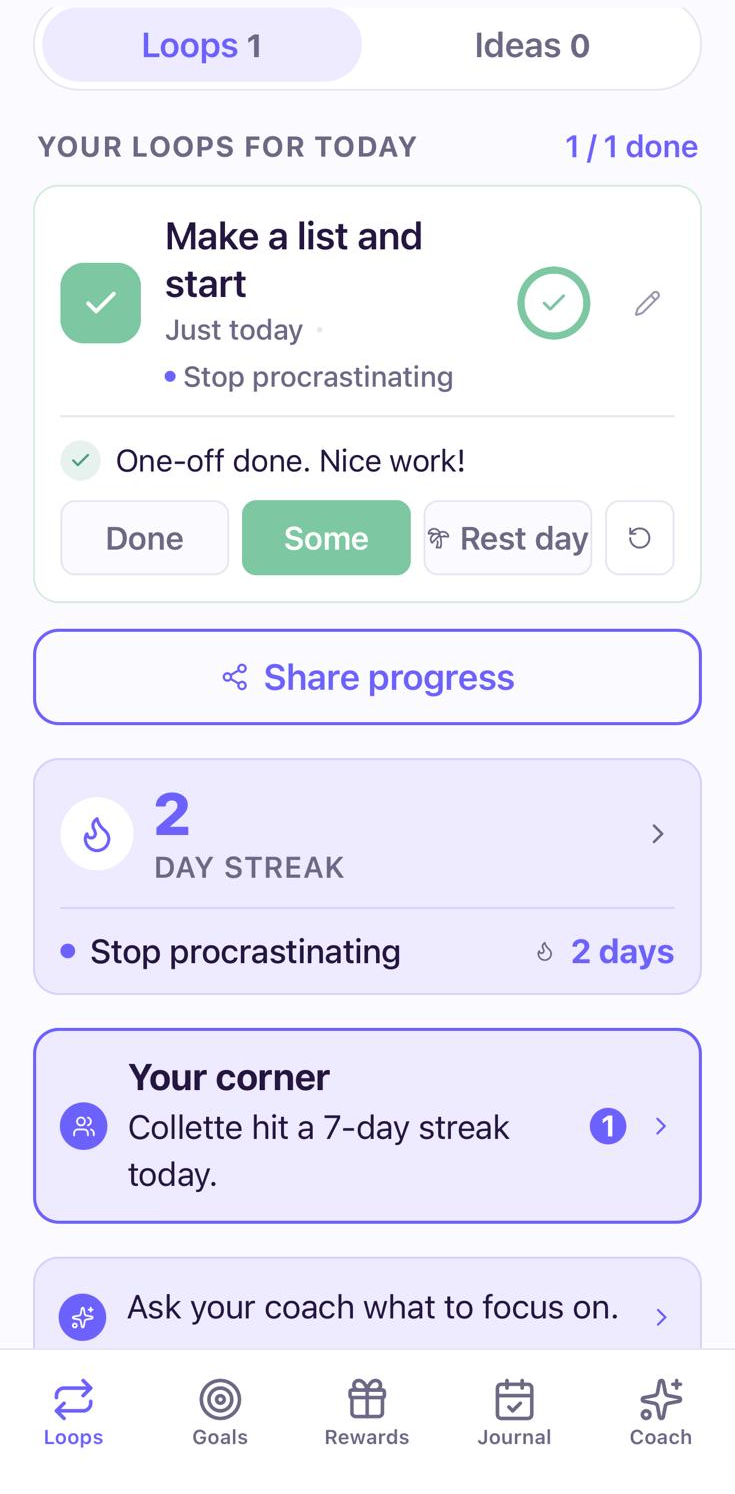
Today
Today's loops in one list. Mark it done, some, or a rest day, and see what your corner is up to.
How Loops helps
A daily system that doesn't depend on you remembering to use it.
Most organisation tools assume the problem is capturing information. Loops assumes the problem is what happens between capturing it and needing it, which is exactly where ADHD makes things go wrong.
Loops gives you clear daily actions, delivered when you need it. Not stored somewhere you'll forget to check. Not buried in an app that requires twenty minutes of setup. There when you need it, in a form your brain can actually use.
Then it adds the part most apps leave out. One person who sees you doing it. More on that just below.
Does any of this sound familiar?
You're not alone in this.
These are the patterns people with ADHD describe most often when it comes to organisation and memory.
You have five different to-do systems running at once. None of them talk to each other. None of them are quite right.
A new app or planner feels exciting for about four days. Then it becomes another thing you've abandoned.
The reminder went off at the wrong moment. You were in the middle of something. You swiped it away. You forgot.
You spend so long deciding which task to do first that the decision itself uses up the time you had.
You know everything is written down somewhere. You just can't find it when you need it, and by then it's too late.
None of this means you're disorganised. It means your brain processes information differently, and the systems most people use weren't built with that in mind.
Understanding the pattern
It's not about trying harder. It's about where the system breaks.
Organisation fails for ADHD brains at specific points that more effort doesn't fix. Each one has a structural cause, and each requires a different kind of solution.
- 01
Out of sight, out of mind
If the task or list isn't visible right now, it doesn't exist right now. ADHD affects the ability to hold things in mind that aren't immediately present, which is why perfectly written lists get made and then never opened.
- 02
Working memory as the actual problem
The failure isn't at the writing-it-down stage. It's at the retrieving-it-when-it-matters stage. ADHD impairs working memory, which is the system responsible for keeping goals and plans active and usable. A list can't fix that if the brain doesn't prompt itself to look at the list.
- 03
The novelty trap
A new system feels energising until it doesn't. Then it gets abandoned completely. ADHD brains respond to novelty with a dopamine boost that fades within days. When the excitement of a new app or planner disappears, so does the motivation to maintain it.
- 04
Overwhelm and analysis paralysis
When everything feels urgent, deciding what to do becomes the task that blocks everything else. Facing a full list without a clear entry point uses up the cognitive resources needed to actually do anything on the list.
- 05
The perfect system trap
The moment a system feels suboptimal, abandoning it entirely feels easier than fixing it. ADHD's all-or-nothing response to imperfection means that one thing out of place in an organisation system can cause the whole thing to be dropped.
Loops is designed to work at every one of these failure points, not just the most obvious one.
Something worth knowing before you try another system
The problem isn't that you need a better system. It's that you have too many.
Multiple lists don't reduce the cognitive load of remembering things. They multiply it. Every new tool, app, or notebook adds another location to check, another thing to maintain, and another place for something to get lost.
The research on ADHD organisation is consistent here: what works isn't more sophisticated capture, it's radical simplification. One place. Visible by default. Requiring as few decisions as possible to use. Not because that's easier to build, but because it's the only kind of system that doesn't become its own thing to remember.
The part most apps miss
Brains finish for people, not for apps.
Forgetting isn't just inconvenient. It's the quiet dread of not knowing what you've missed, and the apologies that follow. Carried alone, that weight builds.
So Loops adds the one thing that reliably keeps ADHD brains going. Another person.
You choose one person you trust. Your partner, a friend, whoever feels safe. When you close a loop, they see it. The thing that would once have slipped, done, and seen. You decide exactly what they can see, and you can change it any time.
This is the step most people skip with other apps. It's also the one that makes Loops work.
All they have to do is see it
When you close a loop, they see it. The thing that would once have slipped, done, and seen. They just get to see you stay on top of the things that matter, and cheer you on.
Not another place to check
They're not another system to keep. They don't nag, they don't manage you, they don't even pay. Their side is light on purpose.
You're always in control
You choose who it is. You decide exactly what they can see, and you can change it any time.
The dread eases
Some of that dread eases when you're not the only one holding it all.
You can start on your own if you'd rather. It still works. It just works better when someone can see you.
Getting started
One action. In front of you. Every day.
You don't need to consolidate all your existing systems. You need something that works on its own.
- 1Step 1
Tell Loops what you're trying to stay on top of
Name the thing that keeps slipping: appointments, tasks, follow-ups, anything. Plain language. No categories or tags to configure.
- 2Step 2
Choose your person, if you want one
Pick one person you trust to see your progress. You decide exactly what they can see, and you can change it any time. They are not another place to check: they simply see what you already do. This is the step most people skip with other apps, and the one that makes Loops work. It's entirely optional.
- 3Step 3
Get small daily actions
Each day, Loops gives you specific, visible things to do. Not a list to scroll. One thing, in a form your brain can act on rather than file away. Close the loop, and your person sees it.
- 4Step 4
Get coached when things pile up
Feeling overwhelmed by what's accumulated? Loops gives you a clear next step rather than a reminder of everything you haven't done.
- 5Step 5
Build a week where nothing slips
Over time, one daily action becomes a pattern of nothing falling through. That's the goal.
You don't need to fix your existing systems first. Start with one thing today.
What's inside Loops
Five simple things, working together.
01
One goal, in your own words
The thing that keeps slipping, described your way: appointments, tasks, follow-ups, whatever it is. No categories, no tags. Just a clear picture of what you're trying to stay on top of.
02
Loops that fit your life
A loop is one small, repeating action, at a pace you choose, delivered to you rather than filed somewhere you'll forget to look. Some run every day, some a few times a week: check tomorrow's calendar tonight, send the one reply you owe, put the appointment in the moment you make it. A few connect to your goal. Others are just life, like taking your meds before breakfast. Miss one and nothing is wiped out. The next action is still there, still small, still in front of you.
03
Your person
The one you choose to see your progress: the loops you close and the things that no longer slip. They are not another place to check, they simply see what you already do.
04
Rewards you can feel
Promise yourself something for the moments that matter: a week where nothing slipped, the first time you didn't have to apologise for forgetting, a month of staying on top of the thing that always got away. Loops holds the promise and calls it in when you've earned it, and your person gets to see it too.
05
A coach who knows your whole story
An AI coach built for ADHD. It already knows what you're trying to stay on top of and where things tend to slip, so there's no re-explaining yourself from the start. No booking, no waiting room. It's there when it's all piled up and you can't find the entry point, with one clear next step, not a reminder of everything you haven't done.
What people say
From people who recognise themselves in this.
I had Notion, a paper planner, three different reminder apps, and a whiteboard. I was still missing things. Loops was the first thing that didn't ask me to remember to use it. It just showed up.
Account manager
Diagnosed with ADHD at 33
The problem was never that I didn't write things down. It was that I had too many places things were written. Loops fixed that without me having to consolidate anything.
PhD student
Using Loops for 6 weeks
I went a whole week without apologising to anyone for forgetting something. I didn't realise how much energy I was spending on the dread of what I'd missed.
Operations coordinator, Glasgow
Pricing
Choose your plan
One small subscription for the coach, the loops and the streaks. Or buy credits when you need them and nothing else.
- 100 coach messages every month. Free gets 30.
- Nothing rolls over, nothing is wasted. It just resets.
- Cancel anytime.
Loops Solo
Monthly$6.99/ month
1 week free, then $6.99 a month.
Your coach, your loops and your streaks. Month to month, cancel whenever.
Loops Solo
Annual$42.99/ year
Works out at $3.58 a month.
Your coach and your streaks, for a year. Roughly half the monthly price.
Or top up
One-off packs. These credits never expire.
100
credits
100 coach message credits
$3.99
300
credits
300 coach message credits
$9.99
1,000
credits
1,000 coach message credits
Best rate
$29.99
Every plan starts with a week free. On iPhone and Android.
A few things worth knowing
Common questions before you start
“I've tried every app and nothing sticks.”
Most apps are built for people who remember to open them. Loops gives you one daily action rather than a system to maintain. There's no database to build, no inbox to clear, and no streak to protect.
“Do I have to share my progress with anyone?”
No. Solo works perfectly well on its own. But most people find it works better when one person can see them, and because it's just a view of what you already do, it never becomes another place to check. You decide what your person sees, and you can add them whenever you're ready.
“I just need to be more disciplined about checking my lists.”
The issue isn't discipline. It's how ADHD affects working memory. Research is consistent that ADHD organisation failures happen at the retrieval stage, not the capture stage. Checking more often won't fix a system that relies on remembering to check.
“What if I'm not diagnosed?”
You don't need a diagnosis. Many people using Loops are on waiting lists, self-identifying, or simply recognise that the patterns here feel familiar. If that's you, Loops is built for you.
“Won't Loops just become another thing I forget to use?”
That's exactly what it's designed not to be. One daily action, delivered to you. No system to check. No tab to remember to open. Loops reaches you rather than waiting to be found.
FAQ
Questions people often ask
Still wondering if Loops fits how your brain works? Contact us. A real person will reply.
What is Loops?
Loops is a daily coaching app for people with ADHD and anyone building better habits. It combines personalised coaching, daily micro-actions, one person who sees your progress, and accountability in one system. For organisation specifically, it helps by reducing the cognitive load of managing tasks and keeping one clear action visible every day.
Who is 'your person', and do I need one?
Your person is the one you choose to see your progress: the loops you close and the things that no longer slip. They are not another place to check, they simply see what you already do. They don't nag or manage you. You don't have to add one to start, but it's the part that makes Loops work, so we'll gently encourage it when you're ready.
How does Loops help with organisation if you have ADHD?
It removes the step of remembering to check a system. Each day you get one specific, low-friction action. It's not a task manager or a planner. It's a daily prompt that shows up rather than waiting to be found.
Why do organisation systems keep failing with ADHD?
The failure usually isn't at the capture stage. Most people with ADHD are excellent at writing things down. The failure is at working memory: the system that keeps plans active and usable when you need them. No amount of better lists fixes a problem that exists at the retrieval level.
Do I need an ADHD diagnosis to use Loops?
No. Loops is designed first for people with ADHD but doesn't require a formal diagnosis. If the experiences described here feel familiar, Loops is built for you.
Is Loops a task manager?
No. Task managers store and display information. Loops coaches you through the moment of acting on it. If you already have a task manager, Loops works alongside it rather than replacing it.
What if I miss a day and fall behind?
That's built into the design. Loops doesn't treat a missed day as a failure state. The next action is still there the following day, still small, still designed to be the easiest possible step.
Is Loops available in the UK?
Yes. Loops is available across the UK and is designed around UK contexts and guidance.
How quickly will I notice a difference?
Most people notice a shift within the first week or two, less in what they're getting done and more in the dread of what they might have missed. Building genuine organisational momentum usually takes longer, and Loops is designed to make that sustainable.
The week, handled
A week where nothing slips through.
Not a perfectly organised life. Just the things that matter, actually handled, and, if you want, one person who sees you handle them.
Get Your Account, Free Forever Today.
*Terms and Conditions Apply.
*Terms and Conditions Apply.
New to Loops? It's a free productivity app built around small daily steps, and almost everything in it costs nothing.
Our sources
Where this comes from
This page draws on ADHD clinical guidelines, research into working memory, prospective memory and time perception, and real accounts from people who have tried every app and still forget things. Here's where it comes from.
- Attention deficit hyperactivity disorder: diagnosis and management — NICE
- The Adult ADHD Tool Kit: Using CBT to Facilitate Coping Inside and Out — J. Russell Ramsay and Anthony L. Rostain
- Attention-Deficit/Hyperactivity Disorder (ADHD) and Working Memory — OpenAIRE
- Complex Prospective Memory in Adults With Attention Deficit Hyperactivity Disorder — PMC
- Time Perception in Adult ADHD: Findings From a Decade — A Systematic Review — PMC
- Working Memory Related Functional Connectivity in Adult ADHD — PMC
- I Miss Appointments, Plans and Even Things I Enjoy Because I Can't Keep a Calendar Going — r/ADHD
- The Lived Experiences of Adults With Attention-Deficit Hyperactivity Disorder — PMC
- Does Everyone Here Really “Completely Forget” About Important Appointments, Meetings, Deadlines, Dates Etc.? — r/ADHD
- What Actually Worked for You to Create Routines or Habits With ADHD? — r/adhdwomen
- Effectiveness of Cognitive Behavioural-Based Interventions for Adult ADHD — Wiley
- Evaluating the Evidence: A Systematic Review of Digital Interventions for ADHD — PMC
- Working Memory Training Does Not Improve Performance on Untrained Measures — PMC
- Functional Impairments Among Adults With ADHD — PubMed
- A Systematic Review and Component Network Meta-Analysis of ADHD Interventions — PubMed
- Australian Evidence-Based Clinical Practice ADHD Guideline
Loops is a daily coaching app, not a medical or clinical service. These sources inform how we think about ADHD and organisation; they are not an endorsement of Loops by their authors.